Reviewer
Guide
Reviewer is a ready-made coworker that reviews pull
requests across your workspace. It has a tab of its own in Cowork, Code
review. You tick the repositories it covers and, for each one, name the paths
it watches there, such as src/payments/**. It reviews each new commit of every
open pull request that touches a repository’s paths. It reads the change, the
files around it and the code elsewhere that calls it, and writes one review:
what can break, how likely it is, the fix, and a test that would catch it, each
pointed at path:line.
Reviewer runs on mux, not on your Mac. It keeps reviewing with muxcode closed and your laptop asleep, on DeepSeek V4.1 Flash, the model mux includes with Pro and Pro+. Its model use is billed to you, the member who made it.
A workspace has one Reviewer, and only an owner or admin makes it. Every member who is not a viewer can see it on the Code review tab. Only the member who made it changes it, and any owner or admin may pause or remove it.
It never approves, pushes or merges. It requests changes when the risk to correctness, money or data is high, or when something must not merge as it is, and leaves a comment otherwise. Its reviews are drafts you read first, until you turn posting on.
What Reviewer needs
Section titled “What Reviewer needs”- An owner or admin to make it. A member who is not one sees the Code review tab read-only, with “Only an owner or admin sets one up.”
- Pro or Pro+. Cowork is part of mux’s paid plans, and Reviewer runs on the included model. On Hobby, every Cowork page shows Upgrade in place of its actions.
- The repositories in your workspace’s code index. Reviewer offers the repositories your workspace indexes, the ones ticked under Repositories in mux, and reads the code around each change from that index.
- The mux GitHub App on those repositories, with access to read code and to write pull request reviews. An owner installs it from mux in the browser.
- Push access for you, the member who makes it. Reviewer reviews as you, so your linked GitHub account must be able to push to each repository it covers. mux checks this when you add a repository or turn reviews on, and again each time Reviewer reads one. Members who only look at Reviewer need no push access.
Create Reviewer
Section titled “Create Reviewer”In muxcode, open Cowork (⌘I), then Code review. On the web, open Cowork in mux, then Code review. The tab has no repository picker, since one Reviewer covers the whole workspace. Once there is one, the tab shows it. While the workspace has none, the tab offers to make it:
-
Tick the repositories it reviews. The list is your workspace’s code index, with a filter once it is long.
-
Under each repository you tick, name the paths it watches there, as globs separated by commas. The field starts at
**, every file. Left at that, Reviewer reviews every pull request in the repository, which uses more of your model allowance than naming the paths that matter, so narrow it before you press Create Reviewer.*matches within a folder,**across folders,{api,web}either name, and a bare path covers everything under it. A glob with a wildcard that ends in/names folders, sosrc/*/covers the files inside each folder ofsrcbut not the files beside them, nor a submodule atsrc/vendor: name a submodule’s path to review a bump of it. A comma inside braces does not split a glob. For example:src/payments/**, src/{api,web}/ledger/**, migrations/Each glob must match a file on the repository’s default branch. As you type, each one is checked on GitHub and shows how many files it matches, or one of these:
- No match: no file on the default branch matches it.
- Not a glob: its braces do not close, it names more than 32 alternatives, or it is longer than 200 characters.
- Can’t confirm: the repository has too many files to list, or mux cannot read it. This never stops you saving.
-
Press Create Reviewer.
mux checks the paths again when you create Reviewer or save a change, and
refuses a glob that matches no file. The refusal names the repository and the
glob, for example “No file on main in acme/shop matches src/paymnts/**.”,
and nothing is changed. Only the globs you add are checked, so a glob whose
files were deleted later never stops a save.
If the workspace already has a Reviewer, mux refuses a second: “This workspace already has a Reviewer. Open Code review in Cowork to see it.”
Reviewer looks at each repository at once, then every 10 minutes. The Code
review tab’s Reviews section lists its repositories with each one’s paths,
which you can edit and save together, when it last looked, and how many reviews
it has drafted and posted. When Reviewer covers more than one repository, it
names the repository in each Activity line, as owner/name#42.
On the web, Reviewer’s page has three sections: Activity, Reviews and Settings. In muxcode the same page also shows the sections every coworker has, Tasks, Routines, Open items, Rules and Secrets; Coworkers says what each holds. Reviewing a pull request uses none of them.
If mux refuses a repository, for example because you cannot push to it, the card says which one and why, in mux’s words, and nothing is changed.
Two kinds of pull request are passed over rather than reviewed, so a repository’s backlog does not spend your model allowance:
- One nobody has touched for a week, the first time Reviewer sees it. Its next push makes it current, and that commit is reviewed.
- One opened by another app’s account, such as dependabot or renovate, whatever it changes. Pull requests that Cowork opens, as mux’s own GitHub App, are reviewed like a person’s.
Adding and removing repositories
Section titled “Adding and removing repositories”Save opens once a tick or a repository’s paths differ from what Reviewer holds. A save that adds or removes a repository asks first, naming each one and what happens to it; a paths edit alone saves at once.
- A repository you add is looked at within a minute. While Reviewer is still drafting, its open pull requests are reviewed as drafts, as at the start. Once posting is on, its open pull requests opened in the last three days are reviewed and posted as they stand, and an older one is reviewed from its next push, so adding a busy repository never posts on its whole backlog. A repository you removed and added again is treated the same way. Reviewer waits until the repository’s code index is complete before it reviews anything there, and Activity says so while it waits.
- A repository you remove is forgotten at once: its queued reviews and drafts go, and a review of it that is running stops. Reviews it already posted on GitHub stay.
- A repository that leaves the code index is taken off Reviewer, and Activity says so. Tick it again on the Code review tab once it is back in the index.
Who sees Reviewer and who changes it
Section titled “Who sees Reviewer and who changes it”Every member of the workspace who is not a viewer sees its Reviewer on the Code review tab: who manages it, the repositories it covers with each one’s paths, and whether it posts. They see it read-only, with a note that only the member who manages it changes it.
Only the member who made it changes it: its repositories and paths, posting, its model, and deleting it. A chat with Reviewer is theirs too. They keep that only while they are an owner or admin of the workspace; if they become a plain member, they see their Reviewer read-only.
Any owner or admin may Pause or resume Reviewer, and remove it with Remove Reviewer on the Code review tab in mux on the web, whoever made it; muxcode’s Code review tab points there. Removing it lets an owner or admin make a new one. Nobody else edits its repositories, posting or model.
A workspace that had more than one Reviewer before Code review keeps them all reviewing for the members who made them. The tab shows the earliest one that posts, or the earliest of all when none posts, and lists the rest under Also in this workspace, where the member who made each can open or delete it. No new Reviewer can be made while any is left.
A reviewer still named Helios, Warden or Argus, the names mux used to give one, is renamed Reviewer the next time mux reads it. A name you gave one yourself stays.
What a review looks at
Section titled “What a review looks at”For each new head commit of an open, non-draft pull request whose changed files match that repository’s paths, Reviewer reads:
- The pull request: its title, description and author, and the diff of each matched file. The code comes first, then its tests, the most changed first.
- The text of the matched files, at the pull request’s head, with line numbers, so it can cite the line that breaks. A short file is shown whole. A long one is shown as the lines around each change. Past the first 12 files, Reviewer reads the diff only.
- The rest of the pull request: the diffs of changed files outside your paths, so the change reads whole. A fix is often in one of them.
- What was said before: Reviewer’s own last review of the pull request, and what its author and people of the repository wrote after it. On a later commit it says in a line that a fixed point is fixed, and does not repeat a point that did not block, answered or not: that point is still in the earlier review. It raises a new point only when it is a defect. A defect it blocked on still blocks until the code fixes it: a reply cannot lift it. A person can, by dismissing the review on GitHub. Reviewer then does not block on those points again, and leaves them out of the risk it states.
- The repository’s
REVIEW.md, as the base branch has it (see below). - The code around the change, from your workspace’s code index: where the functions the change declares or edits are called outside the changed files, and which files import the changed ones. A bug that shows only through a caller in another file is the one a diff alone cannot catch.
- Your workspace’s notes on that repository, when the repository is
private: memory pages kept under
repos/<owner>/<name>/in workspace memory, such as conventions or past incidents. Notes elsewhere are never shown to a review, because a review is read by everyone who can see the pull request. A review of a public repository is shown no notes at all, because anyone on the internet can read it.
A review sees only the repository its pull request is in. When Reviewer covers several repositories, it never shows one repository’s code, notes or paths in a review posted on another.
The index reads the default branch, so a caller it finds may already be changed by the pull request. Reviewer is told this and says so when it matters.
Pull requests that touch none of that repository’s paths get no review. A pull request too large to read in full is still reviewed. All of this is bounded, so a very large pull request is not read in full: a review says so where a finding rests on something it was not shown.
A review that finds nothing wrong says so in a few sentences.
Drafts, and posting on GitHub
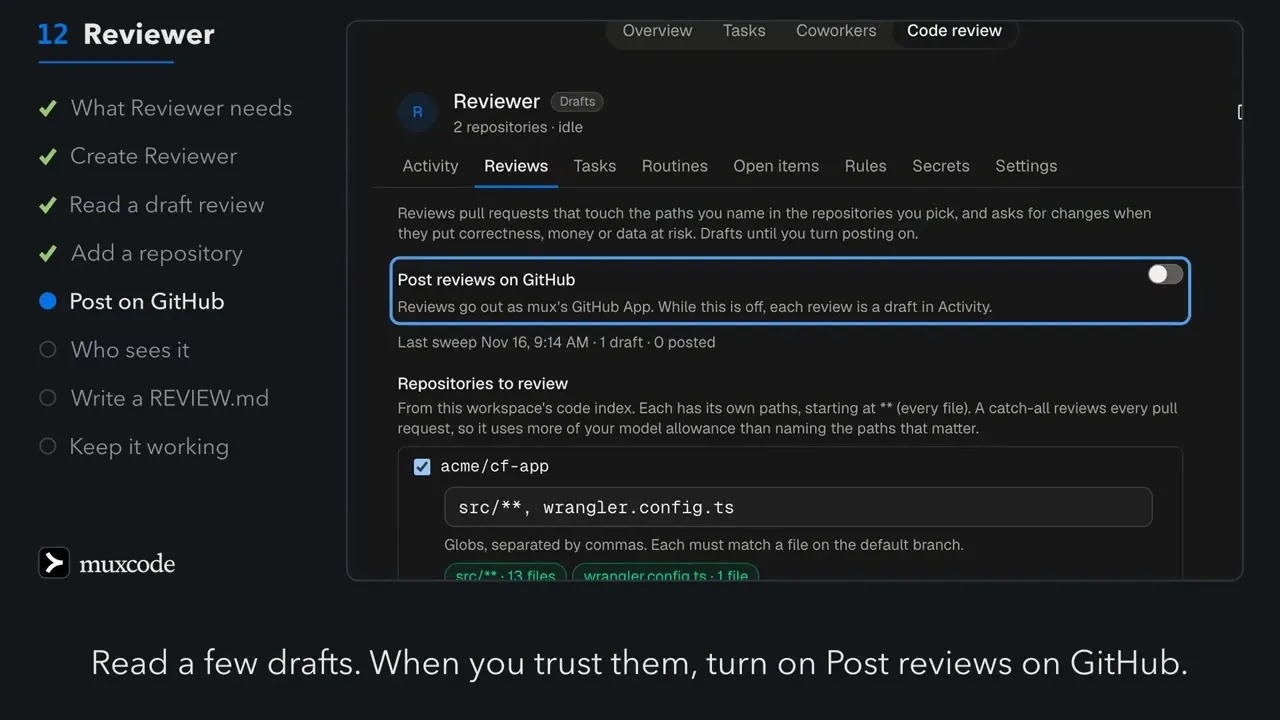
Section titled “Drafts, and posting on GitHub”A new Reviewer keeps every review as a draft in Activity on the Code review
tab: Draft review #42: MEDIUM, formatted as it would appear on GitHub. Read a
few. When you trust them, turn on Post reviews on GitHub in Reviews on
the Code review tab. Reviewer then posts its drafts and every later review as
the mux GitHub App.
On GitHub a review is one of two kinds, and never an approval:
- Changes requested, when the risk is high, or something blocks.
- Comment, otherwise. A comment on a later commit also clears Reviewer’s own earlier request for changes, so branch protection is not left blocked by a review that no longer applies. Reviewer reads that earlier request first, and keeps asking for changes while the code still has the defect. A push alone never clears it: a later commit that takes the change out of your paths is still reviewed while the request stands, so the request is answered.
Each review ends with the coworker’s name and a hidden marker for the commit it read, so a commit is reviewed once, however often Reviewer looks. Turning posting off stops anything still waiting to post.
Write a REVIEW.md
Section titled “Write a REVIEW.md”Put a REVIEW.md at the root of the repository to tell Reviewer what matters
there: invariants, risky areas, what a reviewer should always check. For
example:
- Money is integer cents everywhere. A function named …Cents never returns dollars.- Every write to the ledger holds the ledger lock.- A migration must be reversible and must not lock a table for more than a second.Reviewer reads REVIEW.md from the base branch, never the pull request’s copy.
A pull request that rewrites it does not get to rewrite its own review. If
GitHub is busy, slow or rate limited when Reviewer reads the file, Reviewer
waits and tries again rather than reviewing without it.
How Reviewer stays safe on outside text
Section titled “How Reviewer stays safe on outside text”A pull request’s title, description, code and comments are written by whoever opened it, and could be written to steer a reviewer. Reviewer is built for that:
- Each review runs in a conversation of its own, holding only the review it is asked for. It never sees your chats with Reviewer, its emails, webhooks or another pull request’s reviews, and nothing from a pull request reaches your conversation with it. Its own earlier review of the same pull request, and comments there by the author and people of the repository, are quoted to it as material like the rest. A comment by anyone else is not shown to it.
- A review calls no tools. It cannot read memory, search the index, run a command or reach the web. What it sees of the repository was gathered by mux’s own code before the review began.
- The author’s words are quoted as material, never as instructions, and code reads the verdict from the review’s last lines, so text in a pull request cannot change what kind of review is posted.
- It never approves, so no pull request can talk its way into one.
- A reply cannot lift a request for changes. Only code that fixes the defect does, or a person dismissing the review.
Keeping Reviewer working
Section titled “Keeping Reviewer working”Reviewer works for you, the member who made it, for weeks with nobody there, on a grant mux issues to you. Other members see it, and only you change it, while you are an owner or admin. Any owner or admin may pause or remove it.
- Signing out does not stop it. The grant follows you as a member, not your browser or this Mac.
- Leaving the workspace, or becoming a viewer, ends it at once. So does deleting Reviewer, or an owner revoking it. An owner or admin can remove a Reviewer whose grant has ended, with Remove Reviewer on the Code review tab, and make a new one.
- A plan without Cowork pauses it. It keeps its grant and says in Activity why reviews are waiting, and carries on after an upgrade.
- A review that runs past 30 minutes is stopped and its commit reviewed again later. Pause, or taking the repository off Reviewer, stops a running review at once.
- When its grant ends, Activity says Reviewer stopped reviewing, once, and how to start it again: you open the Code review tab in muxcode or on the web, and it gets a new grant and looks at once.
Activity is also where Reviewer says why reviews are waiting: no model it can use, GitHub not answering twice in a row, a repository whose code index is still being built, or the repository it cannot read.
Memory and the code index in chat
Section titled “Memory and the code index in chat”Reviewer is also an ordinary coworker that you, the member who made it, can message in its Activity. In a chat with you it can read your workspace’s memory and search the code index for the repositories it covers, naming one at a time, for example “where is the refund path tested?”. Writing to workspace memory always asks you first, since the whole workspace reads it. A run that carries outside text, such as a webhook or an email, never touches shared memory or the index.
When something is off
Section titled “When something is off”| You see | What to do |
|---|---|
| Setup required on Reviewer | The member who made it chooses a model in Settings on the Code review tab: DeepSeek V4.1 Flash where your plan offers it. |
| No review on a pull request you expected one on | Check that a changed file matches one of that repository’s paths in Reviews on the Code review tab, and that the pull request is not a draft. Reviewer reviews each new commit, within 10 minutes. A commit that leaves every file of the pull request as it was, such as a merge from the base branch that touched none of them, is not reviewed again: the earlier review stands. |
| No match under a path, or a save refused because no file matches | Check the glob against the repository’s default branch. A path to a file that is not merged there yet is refused until it is. |
| “This workspace already has a Reviewer” | Open the Code review tab to see it. Only the member who made it changes it; any owner or admin may pause or remove it. |
| “Reviewer stopped reviewing” | The member who made it opens the Code review tab in muxcode or on the web. If they have left the workspace or become a viewer, an owner or admin removes Reviewer with Remove Reviewer on the Code review tab in mux on the web, and an owner or admin who can push makes a new one. |
| “Reviews are waiting” | The line says why: a plan without Cowork, no model it can use, the included model’s allowance used up until it resets, GitHub access, or a code index still being built. Fix that, or let the index finish, and Reviewer carries on. |
| A review says it saw no code outside the change | Check the repository under Repositories in mux: Reviewer reads the callers from your workspace’s code index. |
| A review missed what your team always checks | Add it to REVIEW.md on the default branch. |
| Drafts but nothing on GitHub | The member who made it turns on Post reviews on GitHub in Reviews on the Code review tab. |
- Cowork: issues to draft pull requests, and every other coworker.
- How Memory works: workspace and personal memory, and how notes are kept.
- Getting started: the workspace, its code index, and what each plan includes.